


FarOut
4.51.46K Reviews
App Specs
- Version
- 15.7.4
- Updated On
- License
- Free
- Downloads
- 100,000+
- Developer
- FarOut
- Categories
- Maps & Navigation
- Platform
- Android
Screenshots
 Analysis by AppCompare
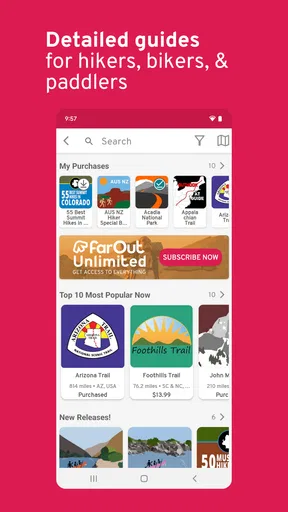
Before deciding whether to rely on FarOut, I’d separate what you can try for free from what you may pay for. It’s a free Maps & Navigation app from FarOut, but it also offers in-app purchases priced from $1.99 to $96.00 per item. That makes it sensible to start with the free access and check the cost of the particular maps or content you want before planning a trip around them. I wouldn’t assume that every trail or tool is included at no cost.
The app is rated for Everyone, and it has a 4.4 average from around 3,100 ratings. It has passed 100,000 installs, which suggests it has found a real audience among people who want outdoor navigation rather than turn-by-turn directions for city driving. The current version is 14.11.7, and it runs on Android 8.0 or later. FarOut also offers an iOS version, so it can suit a group using different phones, although I’d check that each person has the right maps and access on their own device.
Start by matching the purchase to the trip
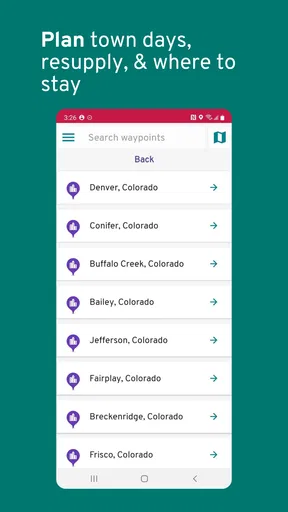
The price range matters because FarOut is not best judged as a single all-or-nothing purchase. If you have one specific route in mind, first identify whether the map you need is available and what it costs in the app. For someone who takes occasional day hikes, paying for a route they will use may make sense; buying a broad set of maps before knowing where they will travel could be overkill. I like that a free starting point lowers the barrier, but I’d treat the purchase screen as part of trip planning, not something to leave until the trailhead.
Think about how often you revisit the same region, too. A person walking one familiar local loop has less reason to invest than a hiker building a multi-day itinerary through unfamiliar terrain. The useful question is not simply “Is the app free?” but “Will the specific information I need justify its listed purchase price for this trip?” That keeps the decision grounded without assuming that a paid item is automatically necessary.
What the navigation approach is good at
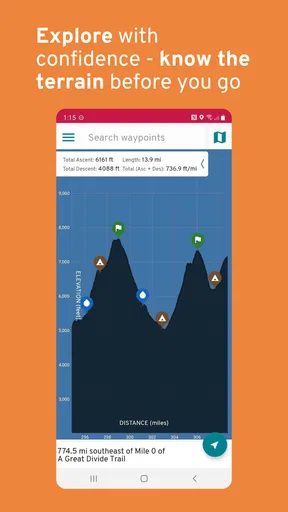
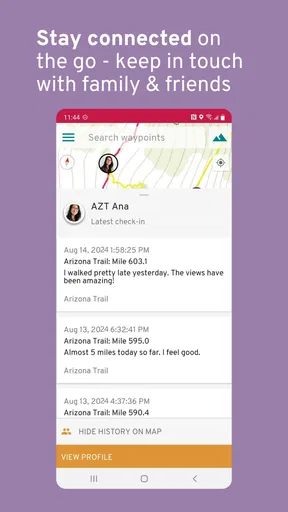
FarOut is most compelling when the route itself is the focus. Its trail-oriented maps, offline use, elevation profiles and community-contributed notes can help you prepare for a hike in a way that a general-purpose map often does not. A standard map app may be more convenient for finding a café, checking roads or getting a quick route across town. FarOut makes more sense when you want to follow a named outdoor route and understand what lies along it.
That difference is important: I wouldn’t use one app as a substitute for every kind of navigation. General maps are usually the easier choice for everyday errands, while a trail-focused app can be more useful when mobile service is unreliable and route context matters. Even then, I’d avoid treating any phone as a complete safety plan. Download what you need in advance, carry enough battery for the day, and keep a backup plan appropriate to the terrain and length of the outing.
A practical planning routine
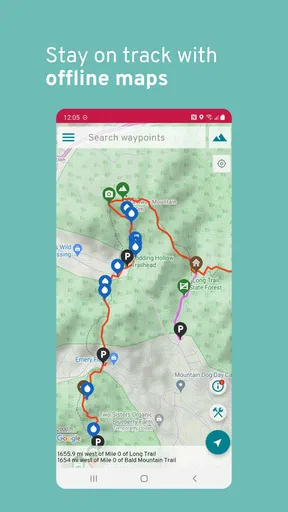
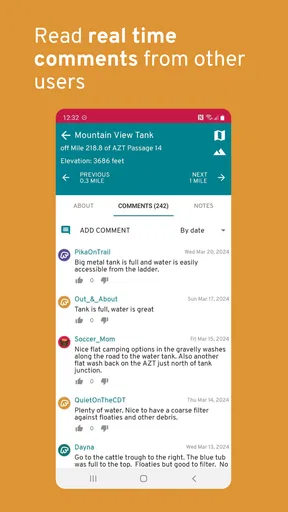
For a weekend hike, I’d choose the route at home, check its map and elevation profile, and save the relevant offline content before leaving reliable Wi-Fi. Then I’d look through recent community notes for practical details that could affect the day, such as a reported change on the route, and mark any points I want to remember. Once I’m outside, I’d use GPS to follow progress rather than repeatedly opening other apps and switching between map sources.
Worth Reading Before You Choose

EA SPORTS FC Mobile 26 Is a Bigger Football Game, but It Takes Time

Flipboard Shows What News Apps Must Do Beyond the Feed

Switching to Android Auto Means Rethinking Your Driving Routine

Google Calendar Makes a Crowded Week Easier to Manage

Ludo King Makes the Most of the Minutes Between Plans

Baby Panda World Brings Quick Play to Modern Phones, but Its Game Library Feels Busy
This workflow also helps with a common mistake: downloading a map but never checking it until service disappears. Confirming that the content is available offline before departure is a simple precaution, and it gives you time to address storage or download issues at home. If you’re going with friends, agree on the route and the map each person needs instead of assuming one phone will cover the whole group. One device can fail, lose power or be left behind, so shared preparation is more useful than relying on a single screen.
Who is likely to get the most from it
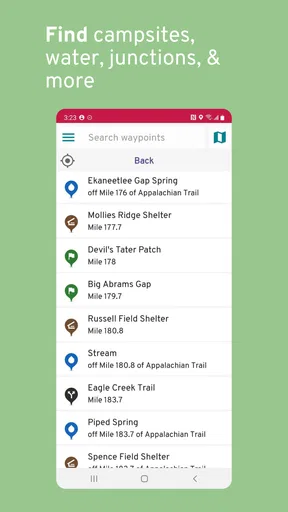
I’d recommend trying FarOut if you hike, backpack, bikepack, paddle or raft in places where route-specific information is useful, especially if you value being able to prepare offline. The combination of route maps, elevation context and notes from other users is more relevant to those activities than to someone who mostly wants city directions. It may also suit a person who likes to research a trip carefully and keep waypoints or personal notes for later.
It is less convincing for someone who only needs a basic map for occasional walks, prefers a simple free route finder, or does not want to make separate purchases for particular content. It may also be the wrong choice if your planned trail is not covered in the way you need. In that situation, a general mapping app, a dedicated local trail resource, or a paper map may be a better fit. I’d check coverage and cost for the exact area first rather than choosing it solely because it is popular with outdoor users.
FarOut was released on November 13, 2018, and its 1,400 reviews provide another place to get a sense of how other users experience it. I’d read feedback with your own use case in mind: a comment from a long-distance backpacker may not answer the same questions as someone planning short day hikes. Likewise, community notes can add useful on-the-ground perspective, but they should be treated as helpful input rather than a guarantee that conditions will remain unchanged.
So, I've been diving into the world of navigation apps lately, and I stumbled upon FarOut. Let me tell you, it’s one of those apps that makes you wonder how you ever got by without it. If you're an outdoor enthusiast, this might just be your new best friend.
A Glimpse into FarOut
Let’s kick things off with what FarOut is all about. It's essentially a navigation app tailored for hikers, backpackers, and outdoor adventurers. Imagine having a trusty guide in your pocket that not only maps your journey but also provides detailed insights and tips. And yes, it’s available on both Android and iOS, so no one's left out in the cold.
Features that Stand Out
First off, the map coverage is pretty impressive. We're talking about major trails like the Appalachian Trail and the Pacific Crest Trail, just to name a couple. FarOut provides offline maps, which is a game-changer. No more worrying about losing service in the middle of nowhere.
The app also offers crowd-sourced information. This means fellow hikers and adventurers share their experiences, tips, and updates, creating a community vibe. You know those little nuggets of wisdom you get from seasoned hikers? Yeah, that’s baked right into the app.
Another perk is the elevation profiles. If you're like me and enjoy knowing what kind of climb you're in for, this feature is golden. It helps you prep mentally and physically for what’s to come.
User Interface and Experience
Now, let's talk about the user interface. It’s intuitive and user-friendly. You don't need to be tech-savvy to navigate through FarOut. The design is clean, and the maps are easy on the eyes, which is crucial when you’re in the great outdoors squinting under the sun.
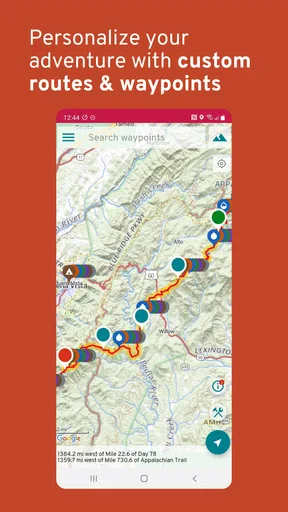
The app also allows you to mark waypoints and add notes. This comes in handy when you want to remember a specific spot or share a tip with others. Plus, the GPS tracking is reliable, so you can track your progress without a hitch.
Performance on the Trail
Performance-wise, FarOut holds its ground. Even in areas where cell service is spotty, the offline functionality keeps you on track. It’s like having a digital breadcrumb trail to follow back to civilization. The app doesn't drain your battery too quickly either, which is a major plus during long hikes.
One thing to note is that the initial download of maps can take some time and space—make sure you have enough storage. But once that’s done, you’re good to go.
Room for Improvement
While FarOut is pretty solid, there are a few areas that could use a bit of polish. For instance, the map updates could be more frequent. And, although the app is largely intuitive, a little more customization in terms of user interface themes wouldn’t hurt.
It would also be fantastic to see more detailed information on lesser-known trails. While the major ones are well-covered, expanding the database could attract even more users.
Final Thoughts
Overall, FarOut is a must-have app for anyone serious about hiking and outdoor adventures. Its combination of comprehensive map coverage, user-friendly interface, and reliable offline functionality makes it a standout choice. Sure, there’s room for improvement, but it already offers a robust set of tools to enhance your outdoor experience.
So, if you’re ready to hit the trails with a bit more confidence and insight, give FarOut a try. You might just find it becomes an essential part of your adventure toolkit.
Making the call for your next outing
My verdict is positive for a particular kind of user: someone who has a real route to plan, will benefit from offline access, and is willing to check the price of the relevant map before committing. The app’s greatest value is not simply having a map on a phone; it is bringing route context, elevation and other people’s observations into the same outdoor planning process. That can make a long or unfamiliar outing feel easier to prepare for.
I would skip it for now if you want a completely free, all-purpose navigation tool or only need directions around town. I’d also avoid buying content until I had confirmed that it covers my intended route and fits how I travel. For a hiker who wants those specifics, though, FarOut is worth a close look. Start with a single planned trip, prepare the offline content before leaving, and judge its value by whether it helps you make better decisions on that route—not by how many features an outdoor app can list.
Pros
- User-friendly interface enhances navigation.
- Detailed offline maps for remote areas.
- Real-time weather updates included.
- Customizable routes for personalized trips.
- Strong community support and feedback.
Cons
- Limited free features; subscription needed.
- Occasional GPS inaccuracies reported.
- Heavy battery usage during tracking.
- Large app size requires ample storage.
- Some features require constant internet.
FAQs for FarOut
What platforms is FarOut available on?
FarOut is available on both Android and iOS platforms, making it accessible to a wide range of smartphone users. You can easily download it from the Google Play Store for Android devices and the Apple App Store for iOS devices. Ensure your device meets the minimum system requirements for optimal performance.
How do I get started with FarOut after downloading?
Once you've downloaded FarOut, you’ll need to create an account or sign in with an existing one. The app will guide you through a quick setup process, including personalizing your preferences and setting up any necessary permissions. This ensures a seamless user experience tailored to your needs.
Are there any in-app purchases or subscriptions in FarOut?
Yes, FarOut offers in-app purchases and subscription options. While the basic features are free to use, certain premium features require a subscription. These may include advanced tracking and exclusive content. Check the app store for detailed pricing information and decide based on your usage needs.
Does FarOut require an internet connection to function?
FarOut requires an internet connection for initial setup, updates, and certain features. However, many of its functionalities, such as offline maps and pre-downloaded content, can be accessed without an active internet connection. This is particularly useful for users in remote areas with limited connectivity.
Is FarOut suitable for beginners or more advanced users?
FarOut is designed to cater to both beginners and advanced users. Its intuitive interface makes it easy for newcomers to navigate, while offering advanced features that seasoned users will appreciate. The app provides tutorials and support to help users make the most of its capabilities, regardless of their experience level.


